Reservation Software for Chauffeur Operators

Chauffeur Reservation Software That Keeps Every Booking Ready for Dispatch

Create, update and operate chauffeur reservations without rebuilding the same journey across emails, spreadsheets and dispatch notes. Keep the customer, passenger, route, vehicle, flight information, return journey, pricing and payment status together in one working reservation record.

Airport & point-to-point Hourly & multi-day One-way & return Customer & passenger records
Reservation Control
Chauffeur reservation software dashboard showing bookings, customers, driver assignment, payment and reservation status
✓
Reservation Status Confirmed
£
Payment Connected to Booking
Airport Transfers Point-to-Point Hourly / As Directed Return Journeys Multi-Day Bookings
The Reservation Record

A Booking Should Carry Everything the Next Team Needs

A chauffeur reservation is more than a pickup time. It becomes the source of information for the office, dispatcher, chauffeur, customer service team and finance. The reservation workspace keeps those details structured from the moment the journey is created.

01

Customer & Passenger

Use an existing customer record or create the booking with the contact and passenger information the team needs.

02

Journey Details

Set the booking type, pickup, drop-off, date, time, passengers, luggage, flight details and journey requirements.

03

Vehicle & Return

Select the outbound vehicle and keep a return journey, return timing and return vehicle inside the same reservation.

04

Fare & Payment

Record base fare, return fare, add-ons, VAT, discount, paid amount, payment method and payment status.

05

Ready for Operations

The completed reservation is available for assignment, dispatch, chauffeur communication, payment activity and reporting.

Create Reservation

Build the Journey Once, Then Keep Working from the Same Record

The booking form is organised around the journey rather than a generic contact form. Operators can create airport, distance, hourly or multi-day work and capture the details required to operate it properly.
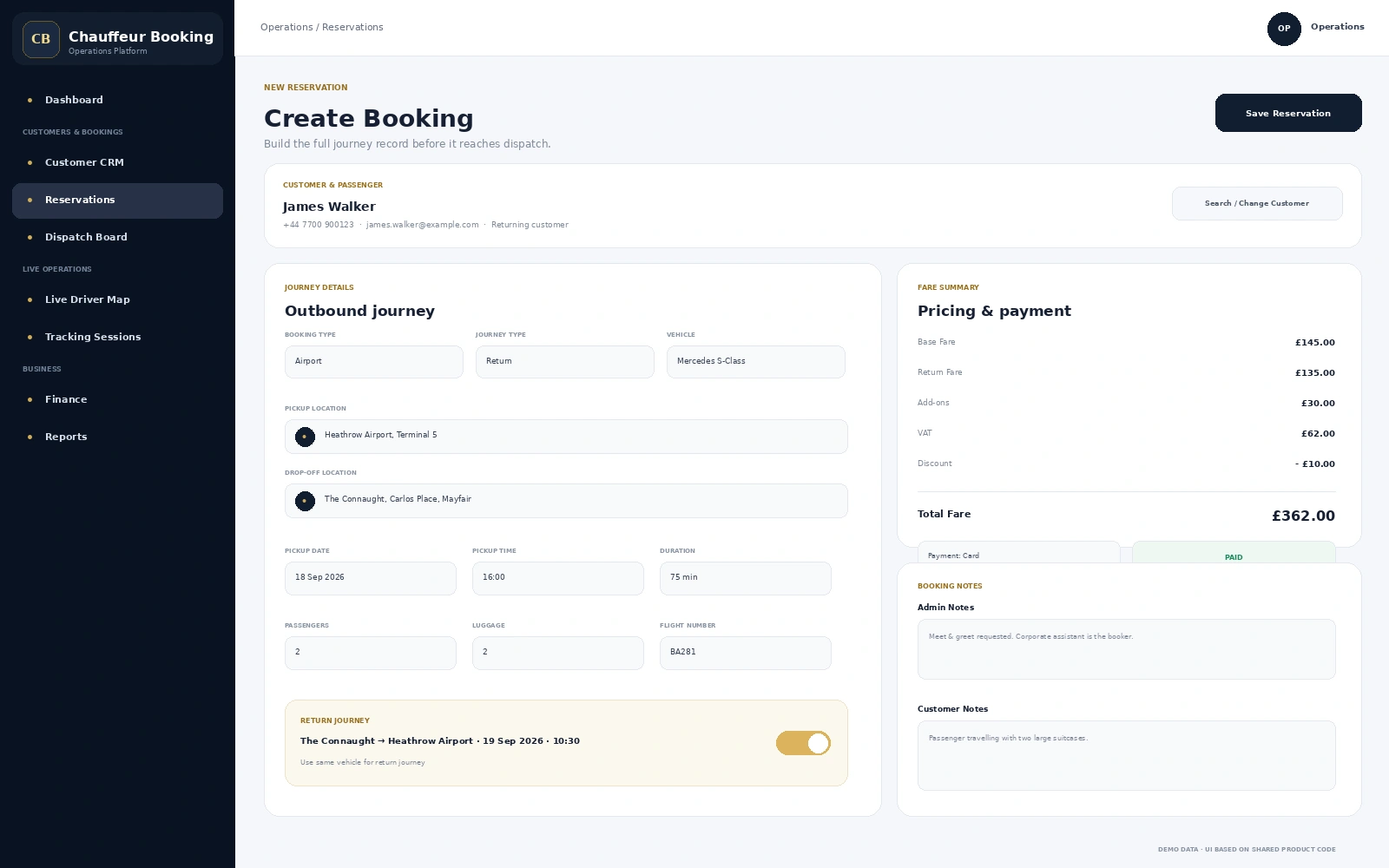
  • Distance, hourly / as directed, airport and multi-day booking types
  • One-way or return journey selection
  • Pickup and drop-off locations with journey timing
  • Passenger and luggage quantities
  • Flight number for airport reservations
  • Outbound and return vehicle selection
  • Admin notes and customer-facing notes
Create Booking
Create chauffeur booking screen with customer, journey, return trip, vehicle, pricing, payment and notes
Different Jobs. One Reservation Workflow.

Handle the Journeys a Chauffeur Operator Books Every Day

Keep different service types structured without turning each one into a separate manual process.

Point-to-Point

Distance Journeys

Store a clear pickup, destination, schedule, vehicle and passenger requirement for direct chauffeur transfers.

Hourly

As Directed

Capture hourly duration when the customer needs a chauffeur and vehicle available rather than one fixed destination.

Return

Outbound + Return

Keep both legs in the same booking with return pickup, drop-off, date, time, duration and vehicle requirements.

Multi-Day

Longer Itineraries

Use the reservation workflow for work that extends beyond a single transfer and needs a longer operational window.
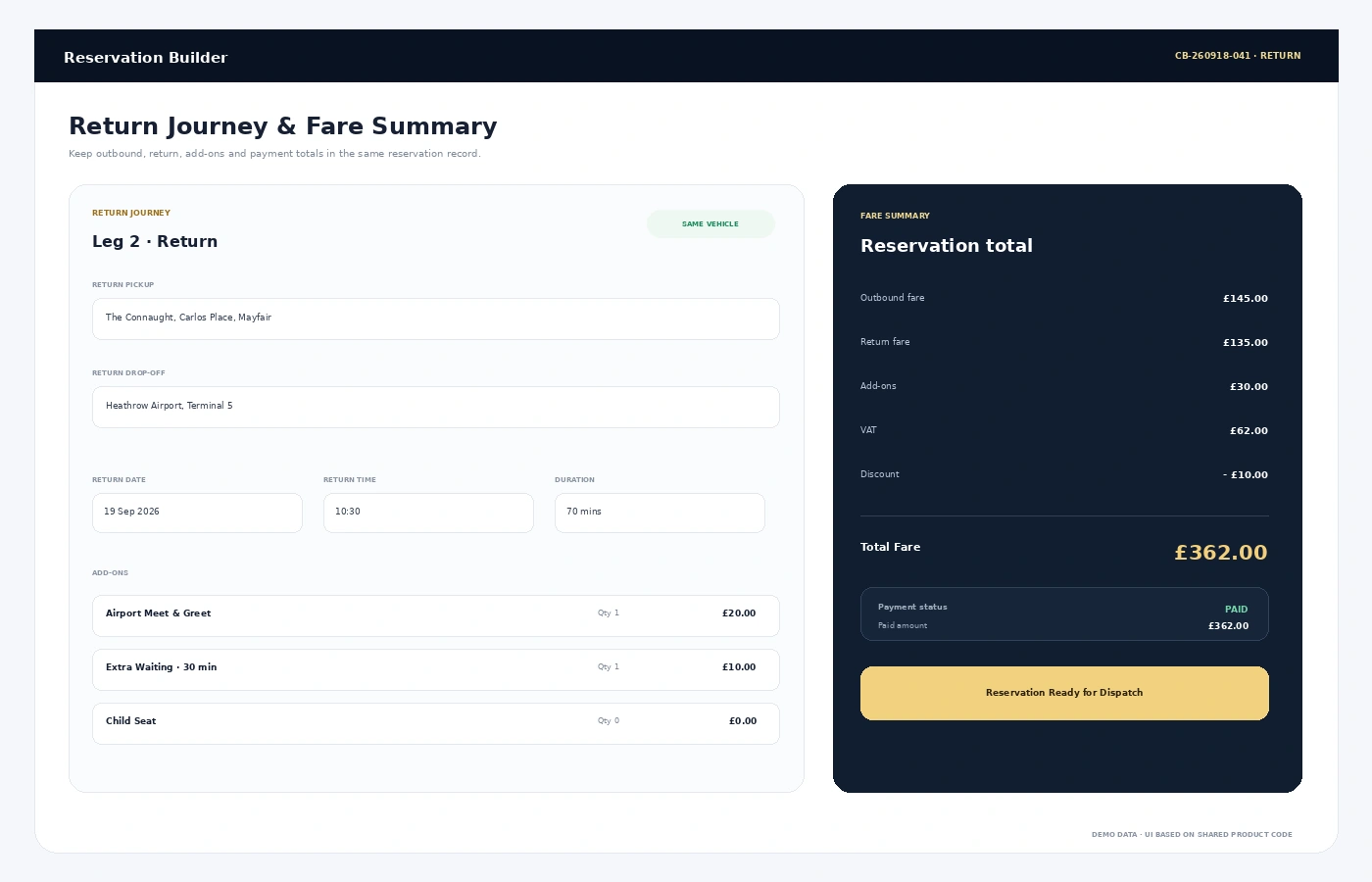
Chauffeur reservation return journey and fare summary showing outbound fare, return fare, add-ons, VAT and payment
Return Journeys & Fare Control

Keep the Return Leg and the Money on the Same Reservation

Return work should not become a second disconnected note. The reservation can hold the return route, schedule and vehicle requirement while the fare summary keeps the commercial side of the booking visible.

Return Journey Pickup, drop-off, date, time and duration
Add-ons Record additional booked services against the job
Fare Summary Base fare, return fare, VAT, discount and total
Payment Status Unpaid, partial or paid visibility on the reservation
Reservation Control

Find the Booking That Needs Attention Without Opening Every Record

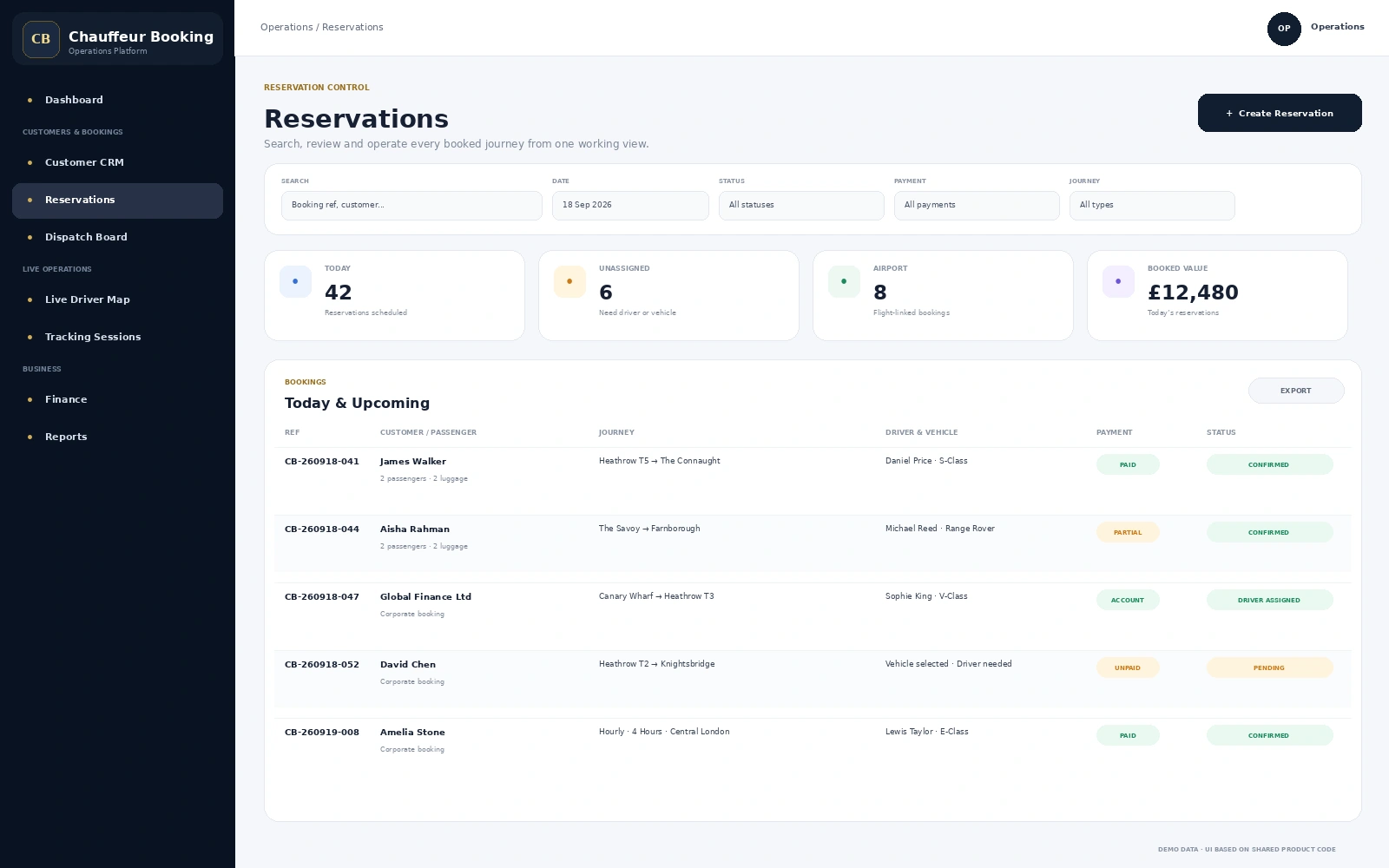
The reservation list gives the office a working view of bookings, customers, journey type, assignment, payment and status so the next action is easier to identify.

Reservation List
Reservation management list with chauffeur booking reference, customer, journey, driver, vehicle, payment and status
01

Search & Filter

Work through reservations by the booking information and operational status your team is looking for.

02

Assignment Visibility

See whether the chauffeur and vehicle are already attached or the booking still needs operational attention.

03

Payment Visibility

Keep unpaid, partially paid and completed payment states visible alongside the reservation.

04

Journey Status

Keep reservation status visible before the booking moves further into dispatch and trip execution.

Complete Booking Record

When Someone Opens a Reservation, the Important Details Are Already Together

The booking details view gives operations one place to check the commercial and operational record before making a change. Customer information, journey legs, flight data, driver and vehicle, payment position and status history stay attached to the booking.
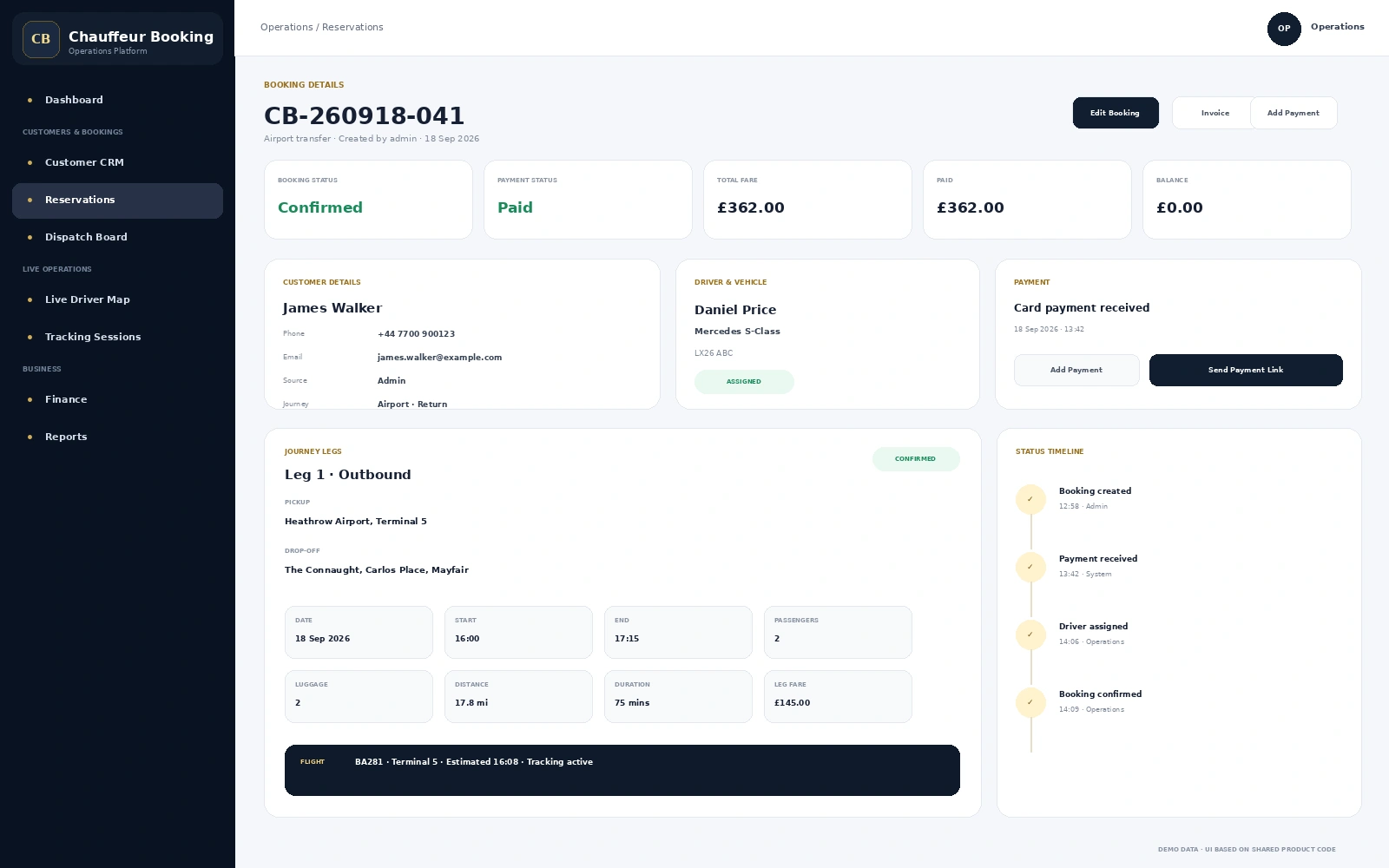
  • Booking and payment status summary
  • Total fare, paid amount and remaining balance
  • Customer details and booking source
  • Outbound and return journey legs
  • Passenger, luggage, distance and duration
  • Flight information when linked to the journey
  • Driver and vehicle assignment
  • Status timeline with booking activity
Booking Details
Chauffeur reservation booking details showing customer, journey legs, driver, vehicle, payment and status timeline
Customer & Passenger Context

Repeat Customers Should Not Feel Like a Brand-New Booking Every Time

Reservations can work with customer records so the office can keep customer contacts, passengers, addresses, notes and previous booking context connected to the wider chauffeur operation.

C

Customer Record

Keep the booking linked to the customer rather than treating every journey as an isolated form submission.

P

Passenger Information

Support bookings where the person arranging the journey and the passenger travelling are not always the same person.

N

Operational Notes

Keep admin notes and customer notes available on the booking so important journey context is not buried in a message thread.

Reservation to Operations

The Reservation Does Not End When Someone Clicks “Save”

Once the booking is created, the same record can continue through assignment, dispatch, chauffeur activity, payment handling and reporting. That continuity is what turns a booking form into operational software.

Built for a Real Booking Desk

Less Rebuilding. Clearer Handoffs. A Better Reservation Record.

One Operational Record

Customer, journey, vehicle, pricing, payment and notes stay attached to the same reservation.

Designed Around Chauffeur Work

Airport, hourly, return and multi-day journeys are handled as transportation workflows, not generic form entries.

Connected to the Next Step

The booking can move into dispatch, driver operations, tracking, finance and reporting without starting again.

Clear for Office Teams

Status, assignment and payment visibility helps the booking desk understand what is complete and what still needs action.

FAQs

Chauffeur Reservation Software FAQs

What is chauffeur reservation software?
Chauffeur reservation software helps an operator create and manage booked journeys with the customer, passenger, route, schedule, vehicle, pricing, payment and operational details needed to run the service.
Can the system handle airport, hourly and return reservations?
Yes. The reservation workflow supports distance, hourly / as directed, airport and multi-day booking types, together with one-way and return journeys.
Can I keep a return journey in the same booking?
Yes. Return pickup, drop-off, date, time, duration and vehicle requirements can stay connected with the outbound reservation.
Does the reservation include pricing and payment information?
The reservation workflow can hold base fare, return fare, add-ons, VAT, discount, total fare, paid amount, payment method and payment status so the commercial position of the booking remains visible.
Can a reservation be connected with dispatch and the driver app?
Yes. Reservations are part of the wider chauffeur management workflow, allowing booking information to continue into assignment, dispatch, driver operations, trip status and closeout.
Can the office see a history of booking status changes?
The booking details view includes a status timeline so operational events such as booking creation, updates, driver assignment, payment activity and completion can remain visible against the reservation.
See the Reservation Workflow

Want to See How Your Booking Desk Would Work Inside the Platform?

Walk through a real chauffeur reservation from customer selection and journey setup through return travel, pricing, payment status and operational handoff.