Chauffeur Dispatch Software
Run Every Journey from One Live Dispatch Board
See scheduled work, unassigned journeys, active trips, driver offers and completed jobs without jumping between separate tools.
Assign the right chauffeur and vehicle, check conflicts before saving and keep the booking moving from dispatch through trip completion.
Live dispatch board
Driver & vehicle assignment
Conflict checking
Trip lifecycle control
Operations Control
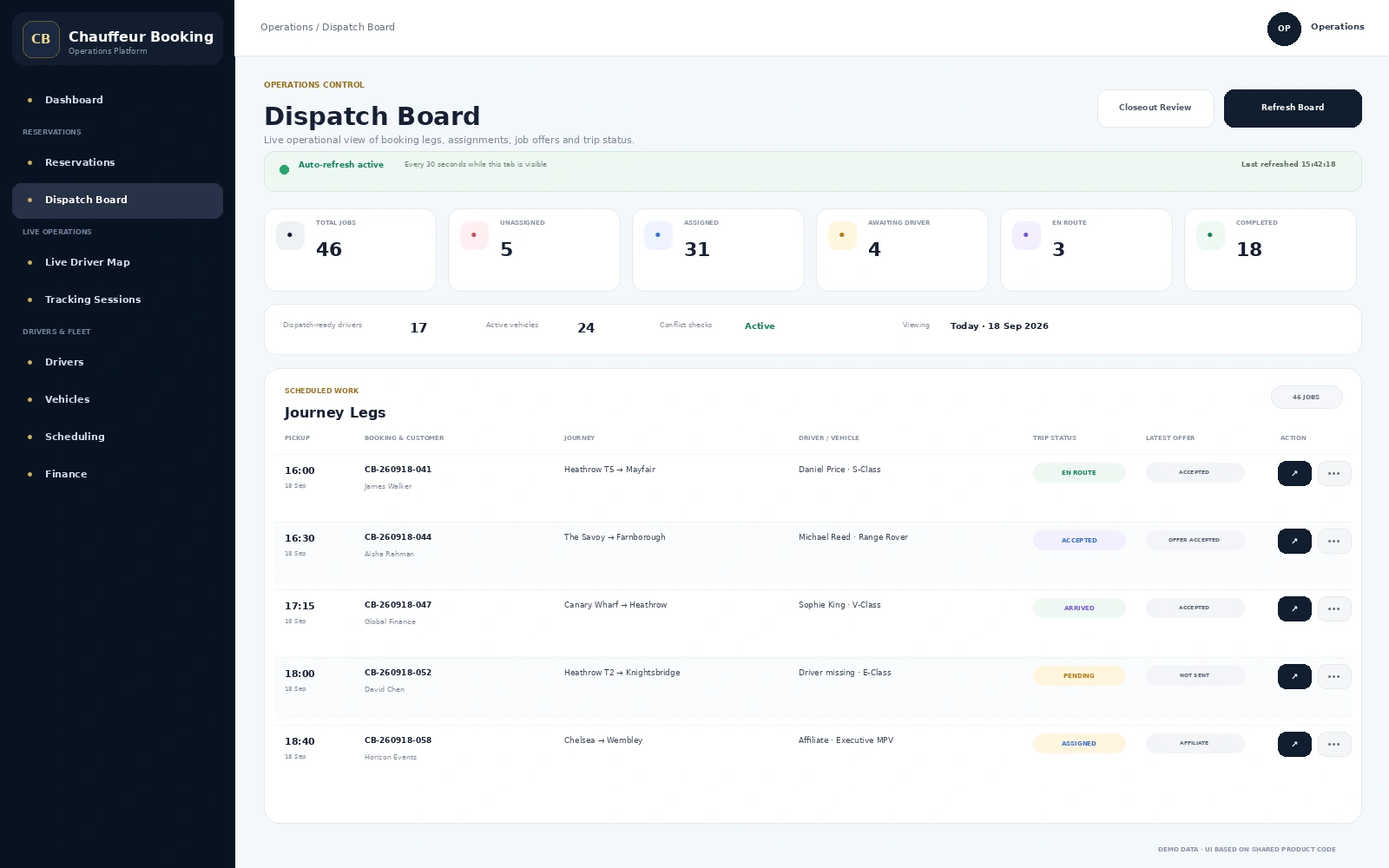
5
Unassigned Jobs
17
Dispatch-ready Drivers
Auto-Refresh Board
Journey Leg Dispatch
Driver Job Offers
Affiliate Allocation
Trip & Closeout Control
Dispatch Without Guesswork
Give Operations a Clear Answer to “What Needs Attention Now?”
A busy chauffeur operation changes throughout the day. New bookings arrive, drivers become unavailable,
journeys move through different trip stages and overflow work may need an affiliate. The dispatch board keeps those changes visible in one working view.
01
See the Workload
Review total jobs, unassigned work, assigned journeys, active trips and completed legs from one live board.
02
Choose Resources
Select the vehicle first, then review suitable chauffeurs who match the assignment requirements.
03
Check Conflicts
Availability and schedule checks help prevent a driver or vehicle from being committed to overlapping work.
04
Send the Job
Issue a driver job offer, manage an affiliate allocation or keep the journey internally assigned.
05
Operate the Trip
Follow trip status, route stops, waiting and completion before the journey moves into closeout and finance.
Live Dispatch Board
See the Whole Day Without Opening Every Booking
Each independently dispatchable journey leg appears on the board with the information operations needs:
schedule, customer, route, assignment, stops, trip status and latest driver or affiliate offer.
- Today, tomorrow, next 7 days and custom date ranges
- Search by booking, customer, driver, vehicle, affiliate or route
- Filter by trip status and assignment state
- Filter by service, booking type, payment and offer status
- Auto-refresh while the board is active
- Dispatch-ready driver and active vehicle counts
Operational Status
From Unassigned to Completed, the Board Keeps the Journey Visible
Dispatchers can work from the operational state of each journey rather than relying on memory or a separate checklist.
Needs action
Unassigned
Driver, vehicle or both still need to be allocated.
Offer workflow
Awaiting Driver
A job offer has been sent and the driver response is still pending.
Accepted
Ready to Operate
The chauffeur has accepted the work and the journey is prepared for execution.
Live journey
En Route / Arrived
Trip stages remain visible as the chauffeur progresses through the journey.
Finished
Completed
Completed work can continue into closeout, charges and financial review.
Driver & Vehicle Assignment
Check the Assignment Before It Becomes an Operational Problem
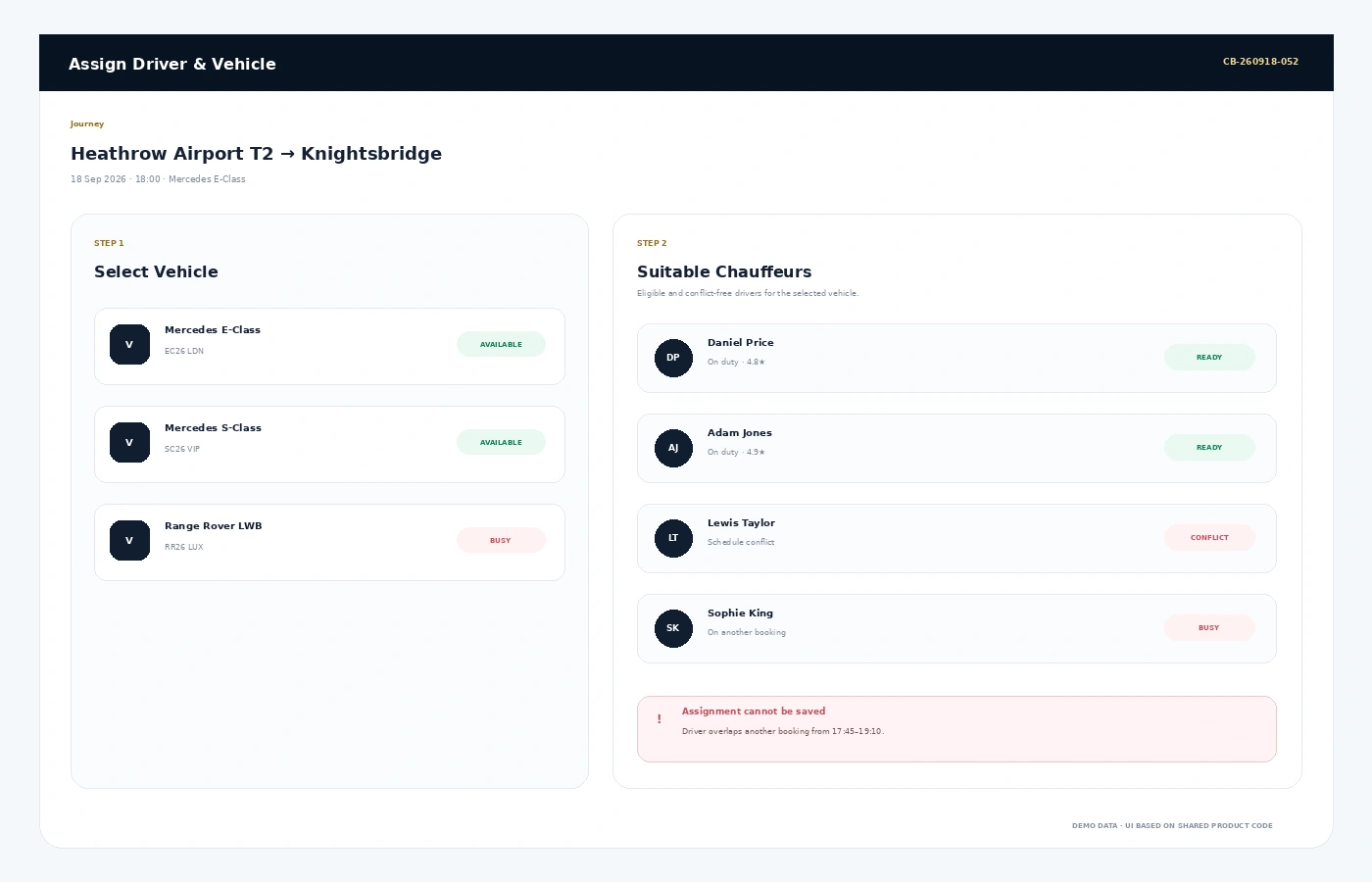
Dispatch starts with the right resources. Select the vehicle, review suitable chauffeurs and let the system check
whether the proposed allocation conflicts with other bookings or driver availability.
Vehicle First
Choose the vehicle required for the journey before reviewing suitable drivers.
Eligible Chauffeurs
Review drivers who are suitable for the selected vehicle and current assignment.
Conflict Checks
Schedule and booking conflicts can block an unsafe or impossible assignment.
Reassign When Needed
Operations can change or remove resources when plans change.
Internal or Affiliate Fulfilment
Keep the Dispatch Decision Attached to the Journey
Whether the work stays with an internal chauffeur or is allocated to an affiliate, the fulfilment status remains visible on the dispatch record.
01
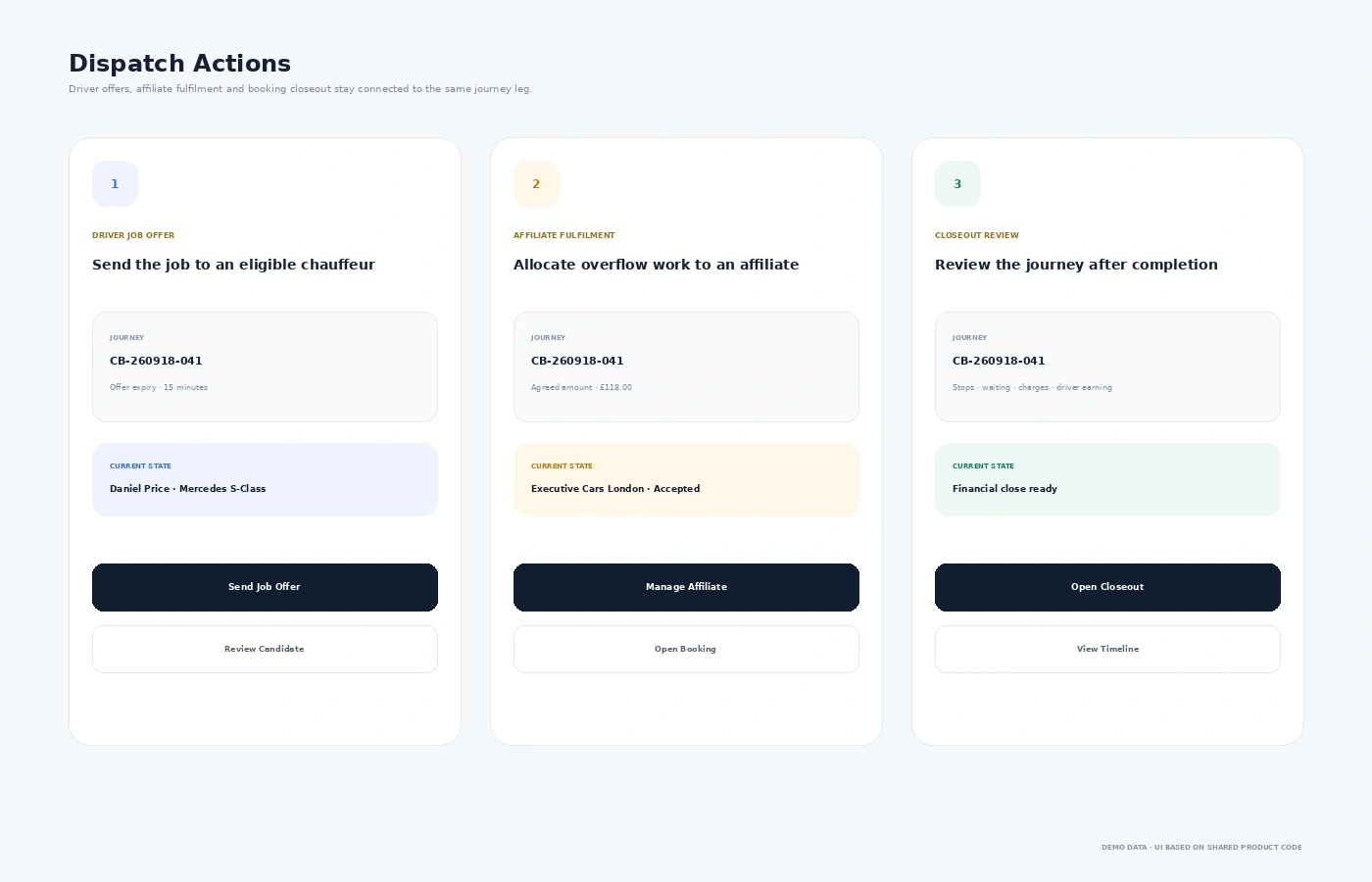
Driver Job Offers
Send a journey to the chauffeur and keep the latest offer state visible from the board.
02
Offer Expiry
Time-limited job offers help operations see when a response is still valid or needs attention.
03
Affiliate Allocation
Overflow or partner work can be allocated to an affiliate with fulfilment and commercial details attached.
04
Assignment History
Operational changes remain part of the journey record rather than disappearing into chat messages.
Live Trip Control
Dispatch Can Follow More Than a Simple “On the Way” Status
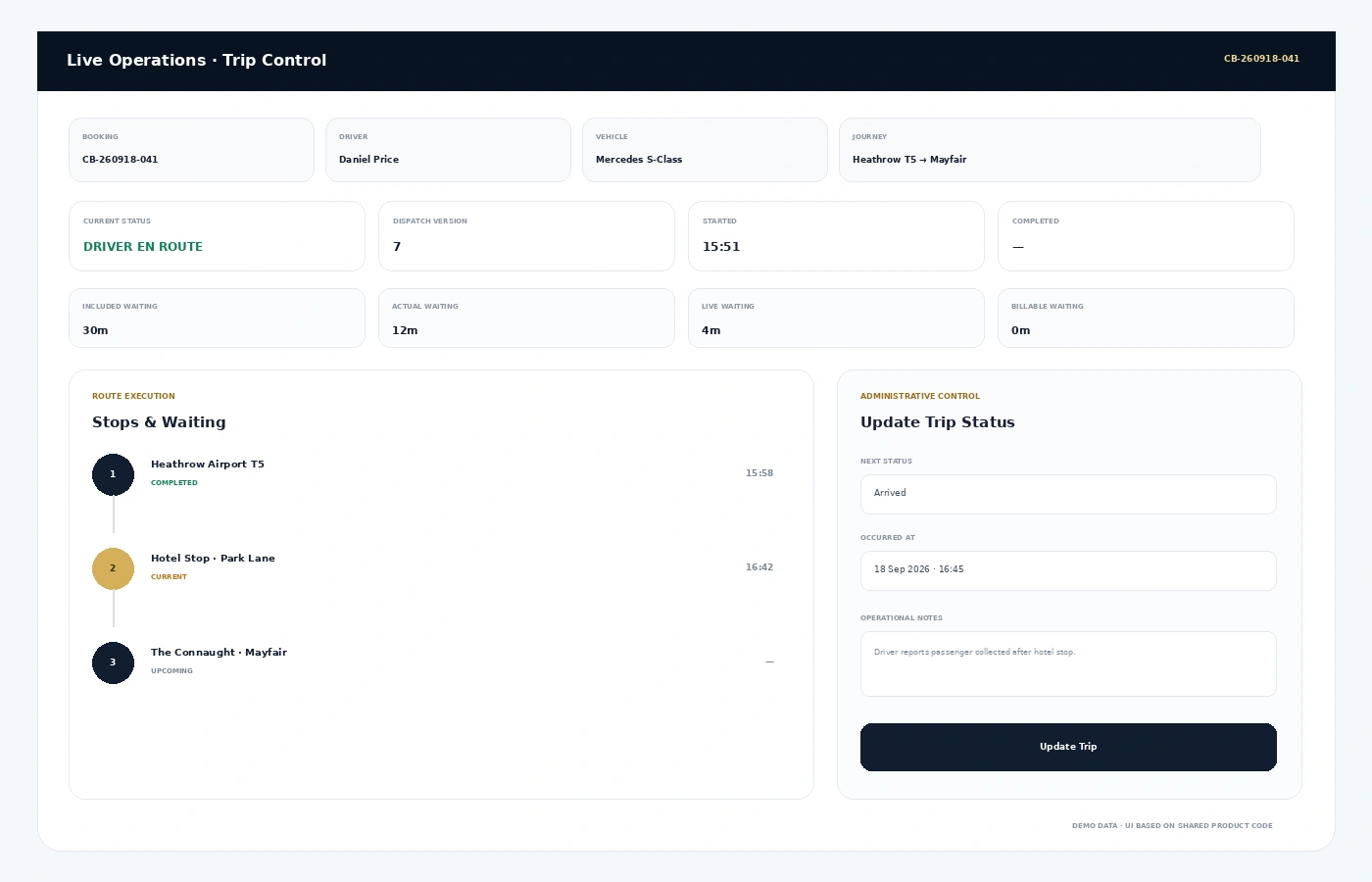
The trip control view brings together the booking, chauffeur, vehicle, journey status, waiting metrics and route execution.
Operations can review what has happened and apply an allowed trip-status update when administrative action is required.
- Current trip status and dispatch version
- Started and completed timestamps
- Included, actual, live and billable waiting
- Route stops and current stop progress
- Allowed trip-status transitions
- Operational notes and audited administrative override
- Trip timeline for operational review
Stops & Waiting
Keep Route Changes and Waiting Visible While the Job Is Running
A professional chauffeur journey can include planned stops, extra stops and waiting beyond the included allowance.
The dispatch workflow keeps those operational details tied to the active journey leg.
Route StopsPlanned stopsTrack progress through the scheduled route.
Extra StopsAdditional journey activityKeep extra stops visible against the job.
Included WaitingAllowanceSee the waiting already included in the service.
Billable WaitingChargeable timeIdentify waiting that may need financial treatment.
Journey Closeout
Completed Does Not Mean the Back Office Is Finished
After a trip ends, closeout review can bring together journey activity, waiting, charges and driver financial information before the booking is financially closed.
Trip ReviewConfirm the completed journey and operational history before final close.
ChargesReview booking-leg charges and supporting operational detail.
Driver EarningsKeep driver earning workflows connected with the dispatched journey.
Financial CloseMove completed work toward final finance and settlement review.
Connected Operations
Dispatch Works Best When It Is Not an Isolated Screen
The dispatch board sits between the reservation and the live journey, carrying the same booking information into driver operations, tracking and closeout.
FAQs
Chauffeur Dispatch Software FAQs
What is chauffeur dispatch software?
Chauffeur dispatch software helps an operations team view scheduled journeys, allocate drivers and vehicles, manage job offers, follow trip status and coordinate active work from one operational board.
Can the system show unassigned and active journeys separately?
Yes. The dispatch workflow distinguishes assignment and trip states so operations can quickly identify work that still needs a driver or vehicle and journeys that are already active.
Does the dispatch system check driver or vehicle conflicts?
The assignment workflow checks candidate suitability and operational conflicts before an assignment is saved, helping prevent overlapping or unsuitable allocations.
Can a job be offered to a chauffeur from the dispatch board?
Yes. Driver job offers are part of the dispatch workflow, with offer status and expiry information visible against the journey.
Can affiliate journeys be managed from dispatch?
Yes. A journey can be allocated to an affiliate, with fulfilment status and agreed commercial information kept alongside the dispatched work.
Does dispatch include live trip and waiting control?
Yes. Trip control includes journey status, route stops and waiting metrics, together with an operational timeline and controlled administrative status updates.
See Dispatch in Action
Want to See How Your Operations Team Would Run a Busy Day?
Walk through unassigned bookings, driver and vehicle selection, conflict checks, driver offers,
trip progress and closeout using a real chauffeur dispatch workflow.