
Chauffeur Management Software Built Around the Way Operators Actually Work
Take bookings, assign chauffeurs and vehicles, follow live journeys, monitor flights, manage fleet compliance, collect payments and close out driver work from one connected system. Your office team sees what is happening now, what needs attention next and what has already been completed.
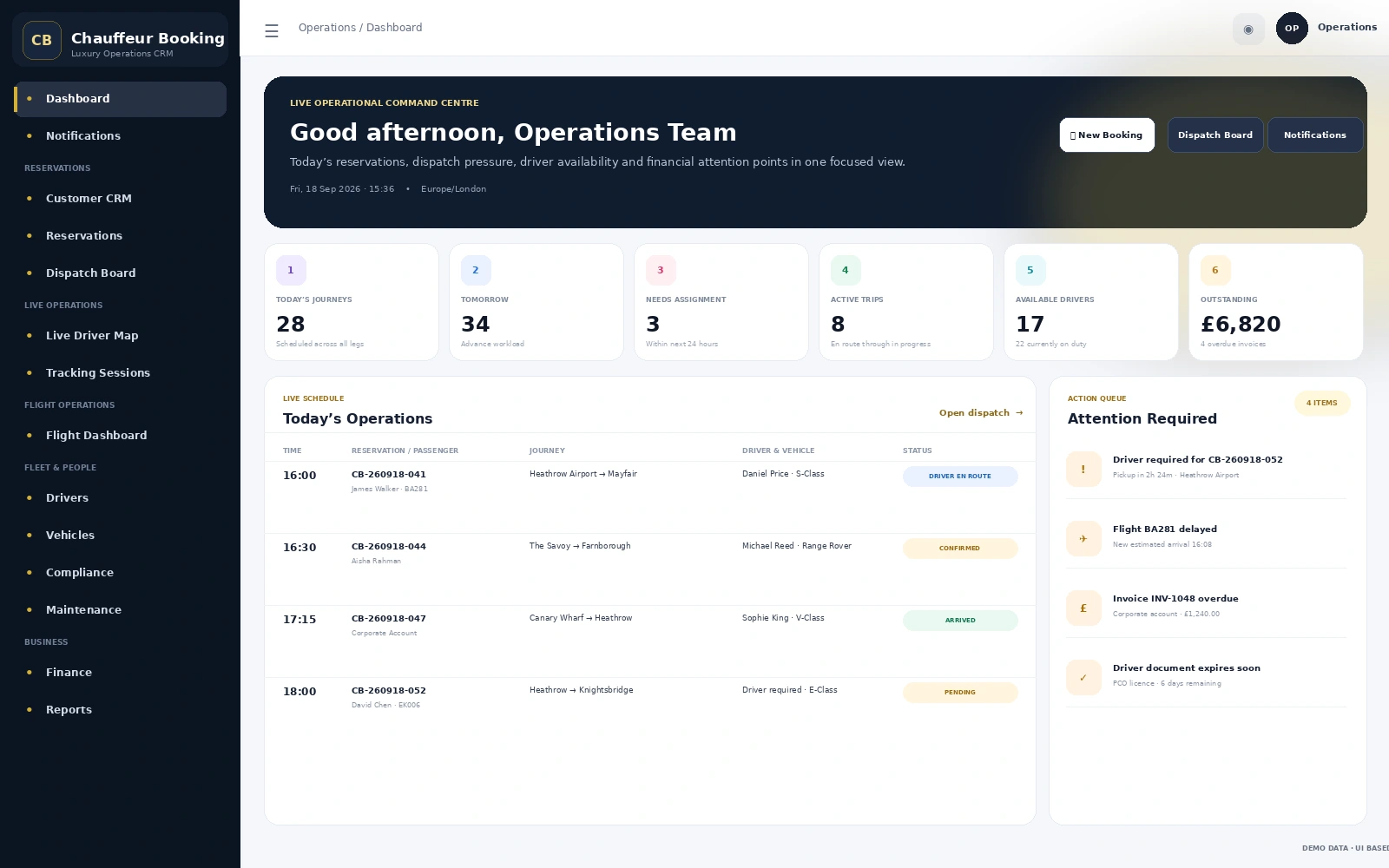
One Booking. One Operational Record. No Re-keying Between Systems.
A reservation should not become a chain of spreadsheets, phone calls and copied messages. The platform keeps the booking connected as it moves through operations, the chauffeur app, live tracking, closeout and finance.
Booking & Customer
Create the reservation, store passenger details, journey information and customer history in one place.
Dispatch & Assignment
Match the correct chauffeur and vehicle, check availability and keep upcoming work visible to operations.
Driver App
The chauffeur receives the job, route, passenger, vehicle and service information needed for the journey.
Live Operations
Follow trip status, driver location, flight information and operational exceptions while the job is running.
Closeout & Finance
Review extras, driver earnings, payments and invoices without rebuilding the journey after it is complete.
Your Team Gets a Working Dashboard, Not Another Spreadsheet
The admin panel is designed around the decisions a chauffeur operator makes throughout the day: what is booked, what is unassigned, which journeys are active, which drivers are available and where financial or compliance attention is needed.
- Customer CRM and reservation management
- Dispatch board with driver and vehicle assignment
- Driver earnings, settlements and pay rules
- Live tracking sessions and passenger tracking links
- Flight dashboard, airport monitor and flight alerts
- Pricing, zones, fixed routes and add-ons
The Day-to-Day Tools Your Operations Team Actually Uses
The platform covers the complete operating cycle without turning the interface into a maze of unrelated tools.
Bookings & Customer CRM
Manage bookings, passenger records, customer contacts, saved information, notes and booking history.
Driver & Vehicle Assignment
Keep scheduled work visible and assign the right chauffeur and vehicle without losing the booking context.
Live Journey Control
Monitor active trips, GPS sessions, journey status and passenger-facing tracking from the admin workspace.
Flight Operations
Keep airport work organised with monitored flights, airport pickup visibility and operational flight alerts.
Drivers, Vehicles & Compliance
Manage driver records, vehicle information, documents, availability, compliance and assignment readiness.
Fleet Maintenance
Track maintenance schedules, inspections, work orders, vendors, odometer records and vehicle downtime.
Invoices, Payments & Payment Links
Keep payment activity tied to the booking, including additional charges, refunds and secure payment requests.
Operational & Financial Reports
Review bookings, finance and operational performance using reports built from the same system your team runs.
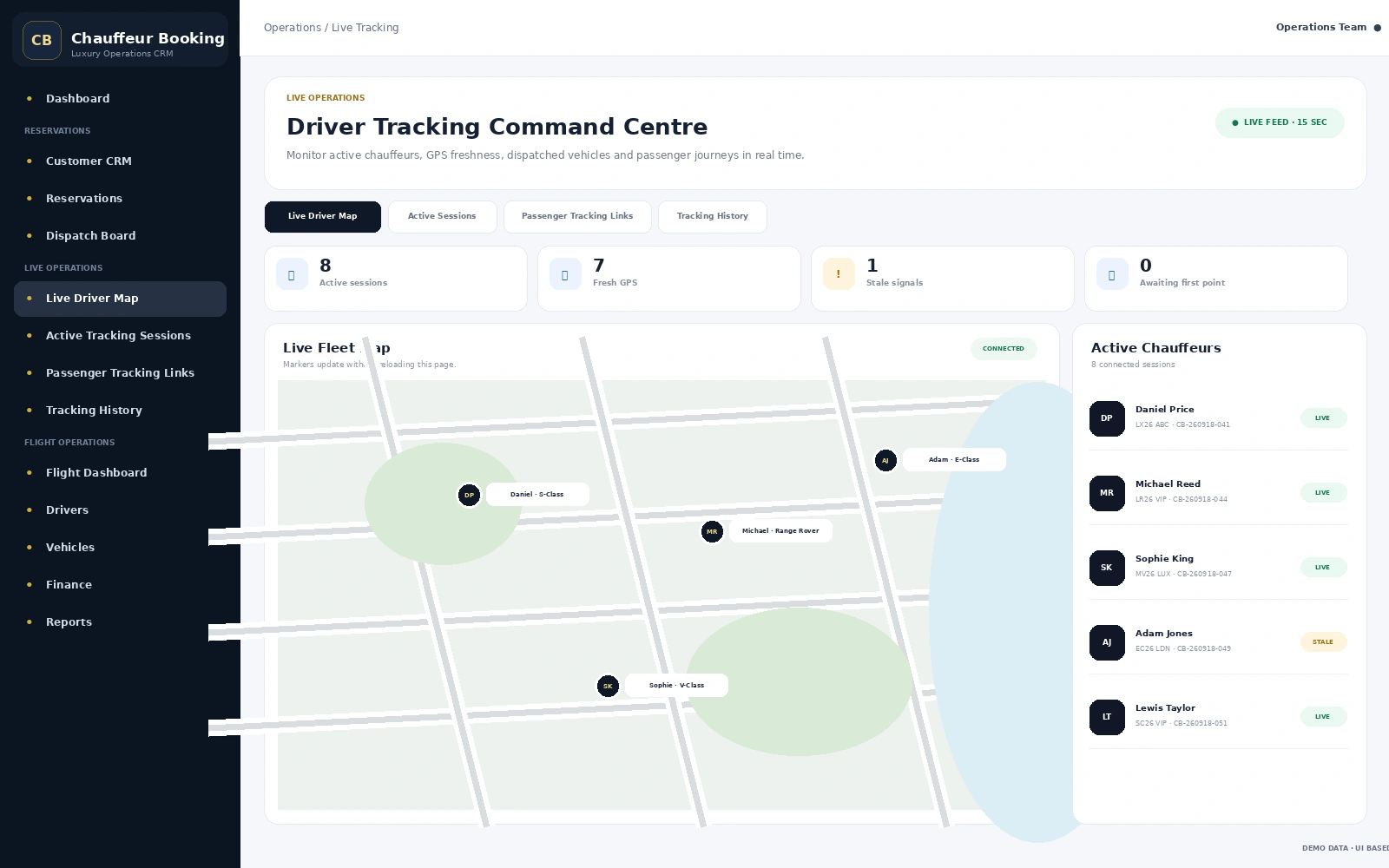
See What Is Happening on the Road Without Chasing the Driver
Operations staff can see active tracking sessions, fresh or stale GPS signals and current chauffeur activity from one command centre. Passenger tracking links can be issued when a customer needs journey visibility without access to the internal admin system.
- Live driver map and active tracking sessions
- GPS freshness and stale-signal visibility
- Passenger tracking links with controlled access
- Tracking history for operational review
- Trip status connected with dispatch activity
Airport Work and Pricing Rules Deserve More Than a Notes Field
Airport transfers, fixed routes and different vehicle classes create operational details that generic booking tools often leave to the office team. These workflows are handled as proper modules inside the platform.
Keep Airport Pickups Visible
Link flight information with airport work and give operations a dedicated place to monitor flight-related bookings.
- Flight dashboard and monitored flights
- Airport pickup monitor
- Flight alerts and status information
- Flight details visible to the chauffeur app
Configure the Way Your Business Prices Journeys
Build operational pricing around your locations, routes and vehicle services rather than forcing every journey into one flat rate.
- Zone management and zone groups
- Fixed locations and fixed-route pricing
- Zone rate matrix
- Vehicle pricing and pricing add-ons
Dispatch Updates Do Not Stop at the Office
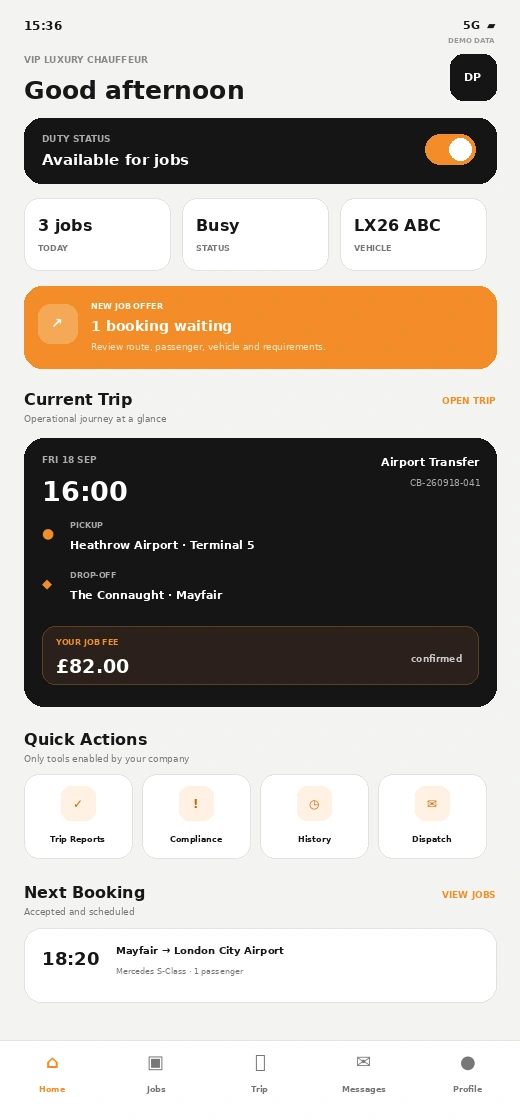
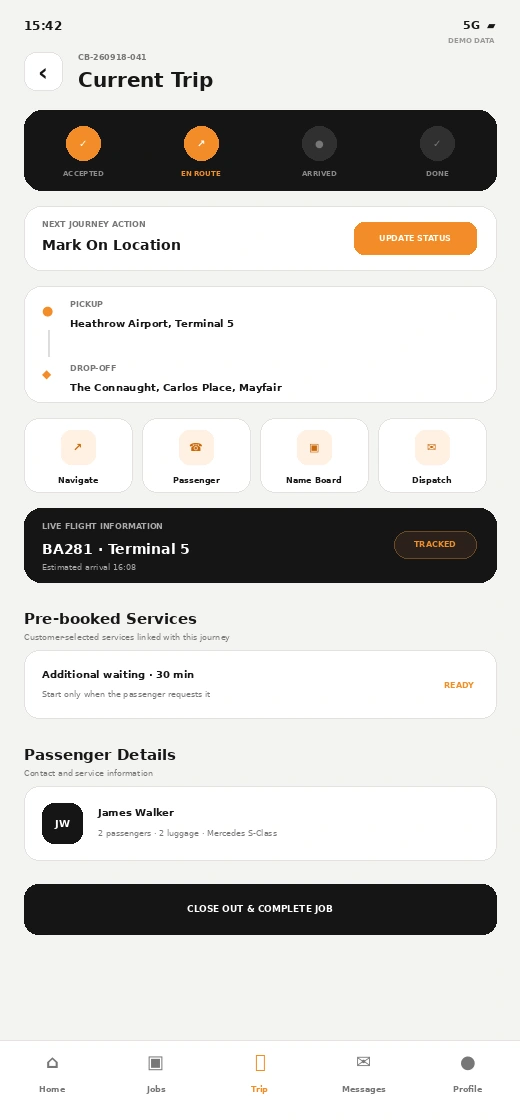
The chauffeur app carries the operational job into the vehicle. Drivers can see their assigned work, route and passenger information, update journey stages and communicate with dispatch without relying on a separate message thread for every booking.
- Duty status, job offers and upcoming bookings
- Pickup, drop-off, passenger, vehicle and service details
- En Route, On Location, Passenger On Board and Drop-off workflow
- Navigation, passenger contact, name board and dispatch messaging
- Live flight information and pre-booked waiting or stops
- Closeout, trip history, earnings, compliance and document tools
Know What Can Be Dispatched Before You Assign It
Driver and vehicle management is connected with the operational side of the business, so your team can keep availability, documents, maintenance and scheduling in the same working environment.
The Operational Detail Does Not Disappear After the Journey
Finance, communication, reporting and customer management stay connected with the booking record, helping the office finish the job properly.
Payments & Invoices
Record payments, manage invoices, refunds and booking-related financial activity in the same system.
Collect Extra Charges
Send payment requests for booking balances or approved extras without creating a disconnected manual process.
Templates & Scheduled Messages
Manage communication channels, templates, schedules, logs and operational messaging workflows.
CRM & Corporate Access
Keep customer history organised and support controlled portal access for eligible corporate accounts.
Partner Operations
Manage affiliates, bookings, manifests, rates, finance and settlements when work is shared with partners.
Incident Management
Record incidents, follow investigation activity and retain operational information in a structured workflow.
Operations & Finance Reporting
Use reporting across bookings, operations and finance rather than rebuilding figures from separate files.
Roles & Security
Manage admin users, permissions, two-factor verification, sessions and audit-oriented security controls.
One Operational Core, Multiple Ways to Use It
The admin panel sits at the centre, while customer bookings, driver activity and account access feed into the same operating workflow.
Give the Right People Access to the Right Part of the Operation
Different team members do not need the same access. The platform includes administrator management, roles and permissions, two-factor verification, active-session controls and audit-focused administration. Company-level configuration also allows the operating environment to be managed around each chauffeur business.
Chauffeur Management Software FAQs
What is chauffeur management software?
Can reservations and dispatch be managed in the same platform?
Does the chauffeur software include a driver app?
Can the system support airport and flight-related bookings?
Can I manage pricing, invoices and payment links?
Can different administrators have different permissions?
Want to See How Your Chauffeur Operation Would Run Inside the Platform?
Walk through reservations, dispatch, live operations, the driver app, fleet control and finance using a workflow that matches your business.